
Stars777 GuideStars777 गाइड: Say goodbye to the hassle that comes with payment delays in Stars777.Stars777 में पेमेंट की देरी की परेशानी को अलविदा कहें।
With Stars777 Guide, go into the age of electronic wallets! For more help, get in touch with our customer service, which is available around-the-clock.
Stars777 गाइड के साथ इलेक्ट्रॉनिक वॉलेट के युग में प्रवेश करें! अधिक मदद के लिए हमारी ग्राहक सेवा से संपर्क करें, जो चौबीसों घंटे उपलब्ध है।
- 24/7 customer service24/7 ग्राहक सेवा
- English + हिंदीEnglish + हिंदी
- Step-by-step screenshotsचरण-दर-चरण स्क्रीनशॉट
Why use the Stars777 guideStars777 गाइड का उपयोग क्यों करें
Every step is shown on a real screen, so you always know where to tap next.हर चरण असली स्क्रीन पर दिखाया गया है, ताकि आपको हमेशा पता रहे कि आगे कहाँ टैप करना है।
Real screenshots and videosअसली स्क्रीनशॉट और वीडियो
Numbered steps, arrows and video walkthroughs show exactly where to tap.क्रमांकित चरण, तीर और वीडियो वॉकथ्रू दिखाते हैं कि ठीक कहाँ टैप करना है।
English and Hindiअंग्रेज़ी और हिंदी
The whole site switches language with one tap, and the UPAY guides use screenshots in your language.पूरी साइट एक टैप में भाषा बदलती है, और UPAY गाइड में आपकी भाषा के स्क्रीनशॉट होते हैं।
New guides and tutorialsनई गाइड और ट्यूटोरियल
UPAY wallet guides plus tutorials for registering, depositing, KYC and buying RPL, all in one place.UPAY वॉलेट गाइड और रजिस्टर करने, डिपॉज़िट, KYC और RPL खरीदने के ट्यूटोरियल, सब एक ही जगह।
Help when stuckकहीं अटकें तो मदद
Reach customer service any time if a step does not match your screen.अगर कोई चरण आपकी स्क्रीन से मेल न खाए तो कभी भी ग्राहक सेवा से संपर्क करें।
Stars777 guidesStars777 गाइड
Pick a Stars777 guide, then follow the steps.एक Stars777 गाइड चुनें, फिर चरणों का पालन करें।
UPAY walletUPAY वॉलेट Newनया
Tutorialsट्यूटोरियल
No guides match your search.आपकी खोज से कोई गाइड मेल नहीं खाती।
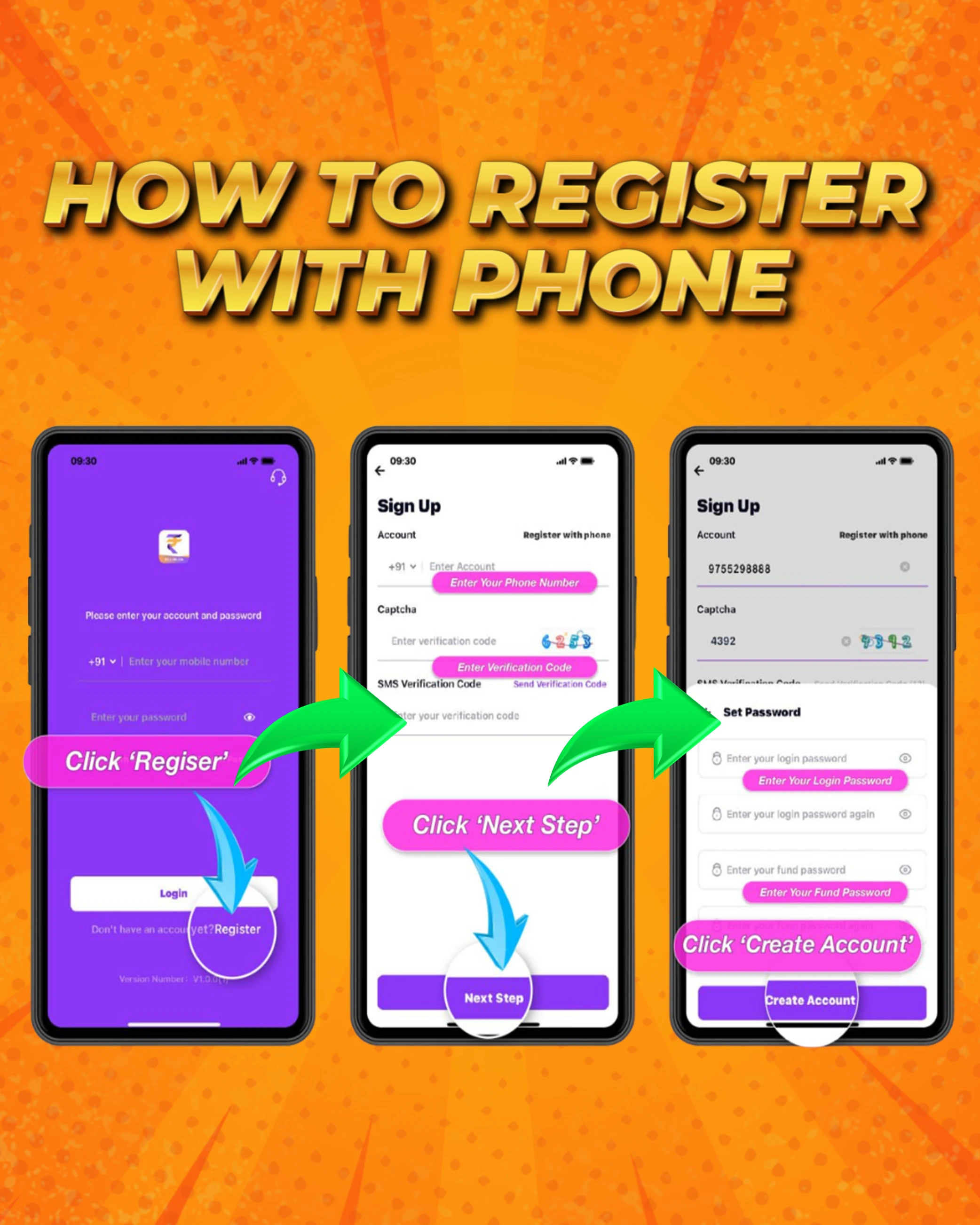
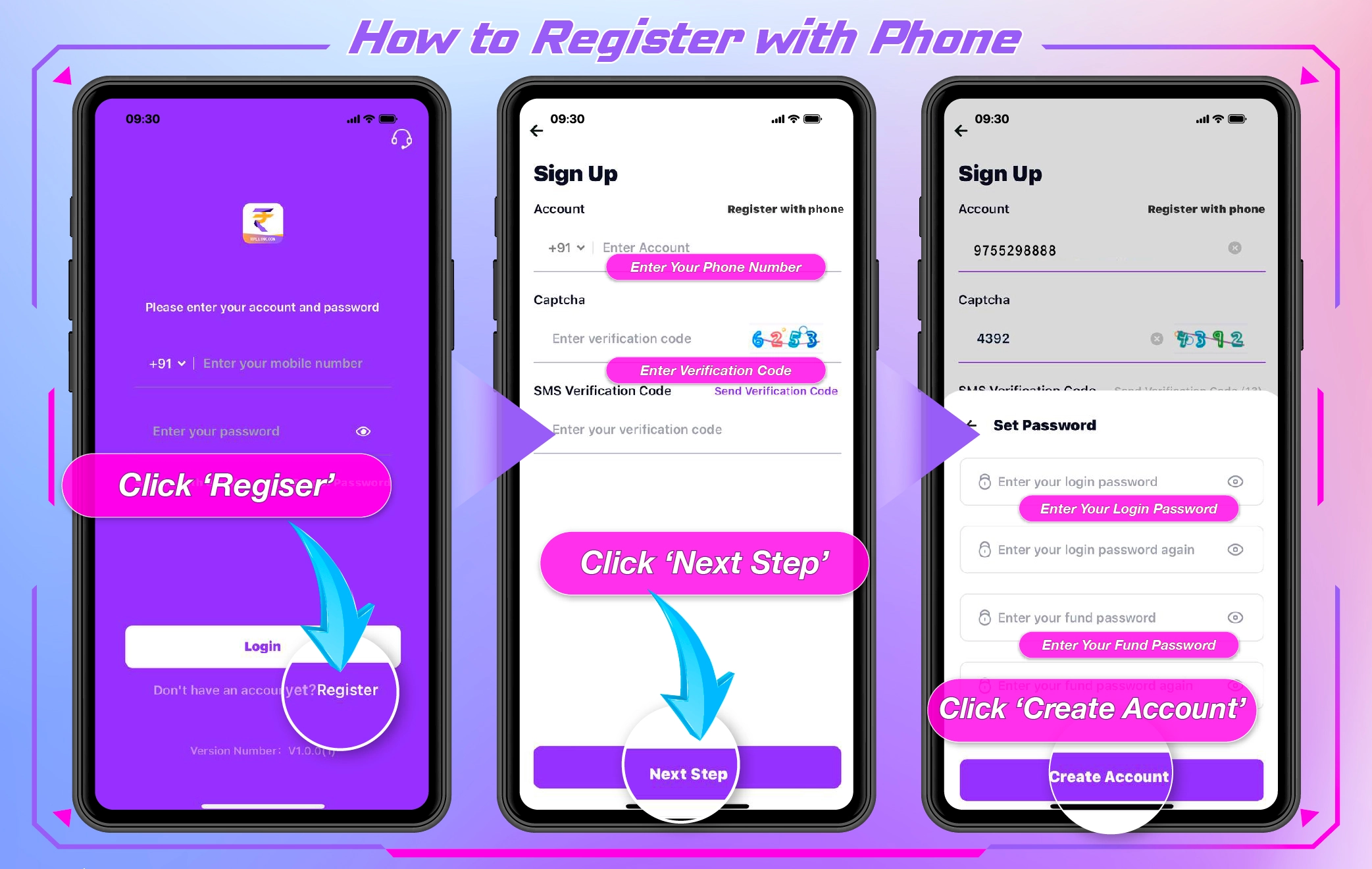
Register with your phone
फ़ोन नंबर से रजिस्टर करें
Create your UPay account using your mobile number.
अपने मोबाइल नंबर से UPay अकाउंट बनाएँ।
- Tap Register.
- Enter your phone number and the verification code you receive, then continue.
- Tap Create Account.
- 'Register' पर टैप करें।
- अपना फ़ोन नंबर और मिला हुआ वेरिफ़िकेशन कोड दर्ज करें, फिर आगे बढ़ें।
- 'Create Account' पर टैप करें।


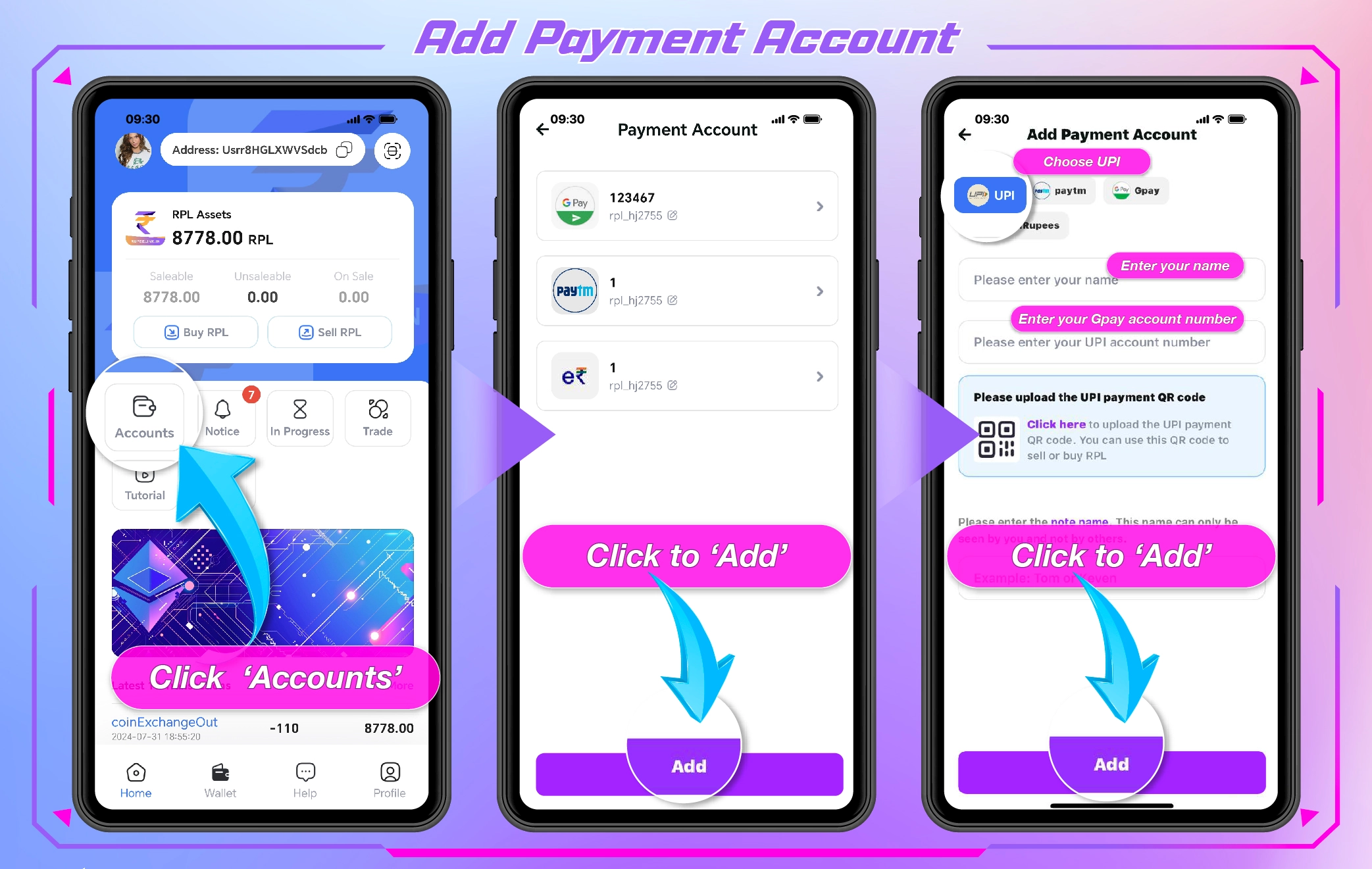
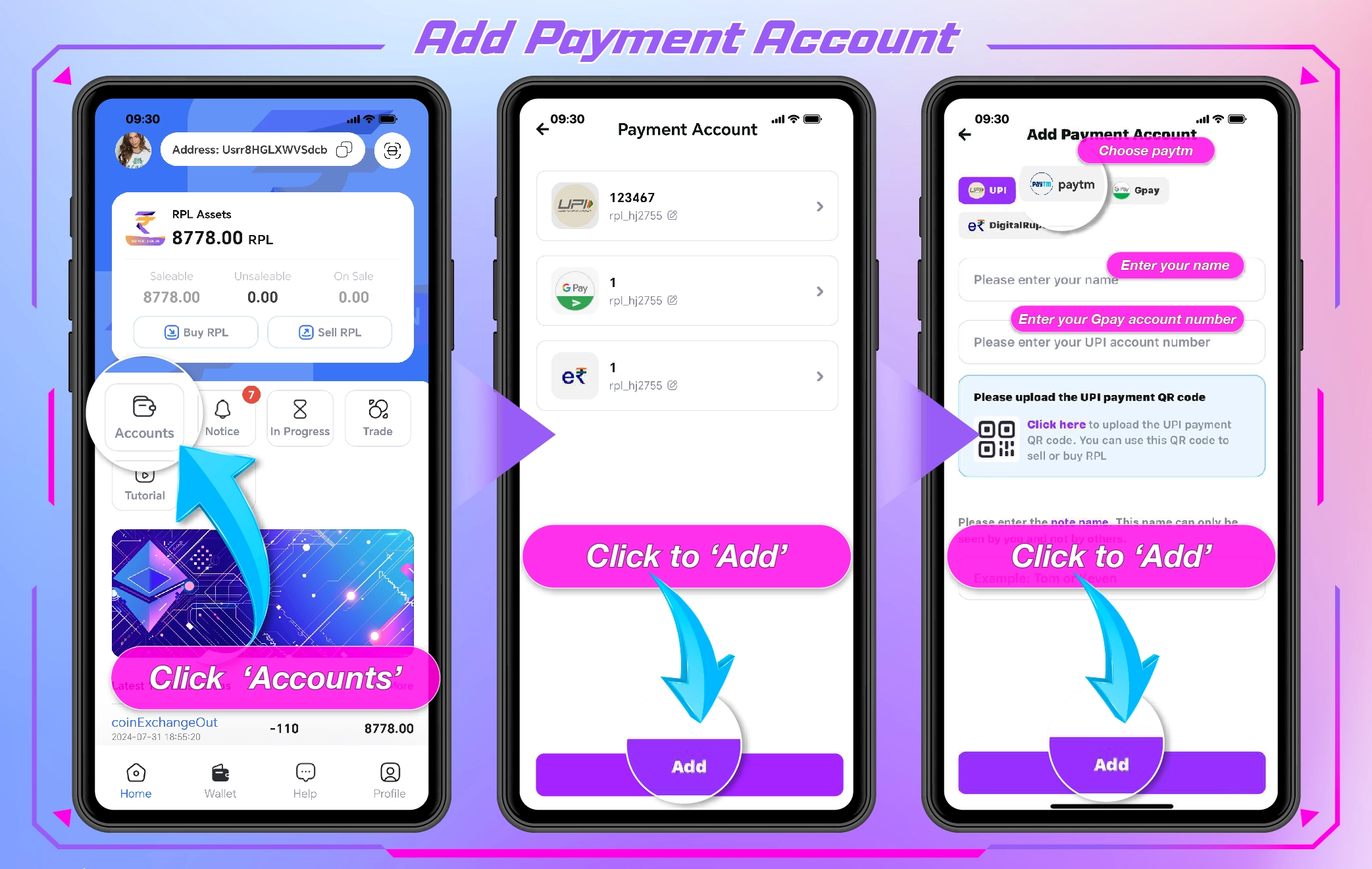
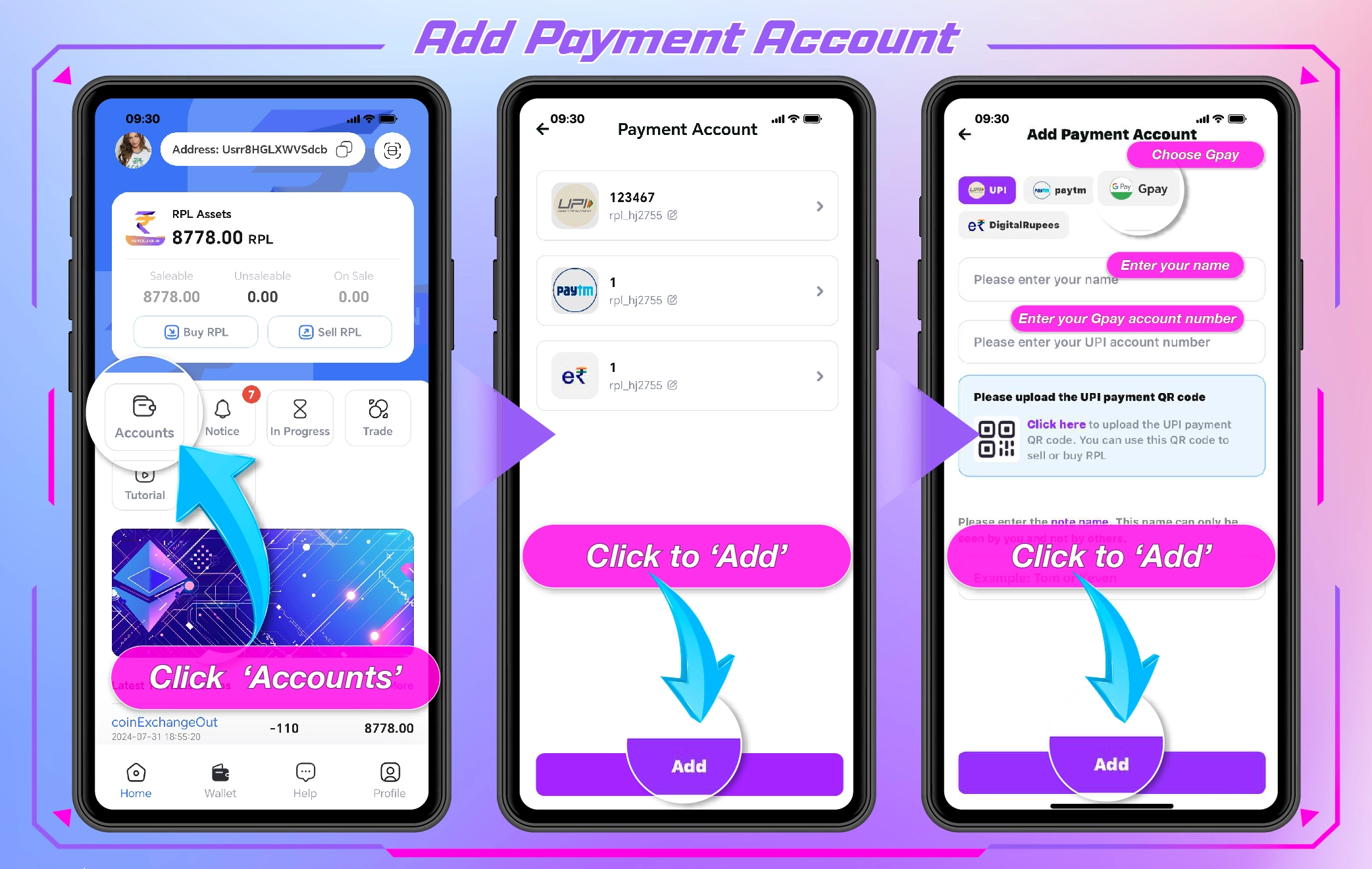
Add a payment account
पेमेंट अकाउंट जोड़ें
Link the payment account you will use to buy and sell.
वह पेमेंट अकाउंट लिंक करें जिससे आप खरीद और बिक्री करेंगे।
- Open Accounts.
- Tap Add and fill in your payment account details.
- Confirm with your fund password.
- 'Accounts' खोलें।
- 'Add' पर टैप करें और अपने पेमेंट अकाउंट की जानकारी भरें।
- अपने फ़ंड पासवर्ड से पुष्टि करें।


Buy RPL (UPAY)
RPL खरीदें (UPAY)
Choose an amount, pay the seller and confirm your order.
राशि चुनें, विक्रेता को भुगतान करें और अपने ऑर्डर की पुष्टि करें।
- Tap Buy and select a fixed amount and your payment account.
- Confirm and enter your fund password.
- Pay the seller, upload your receipt, then wait for the order to complete.
- 'Buy' पर टैप करें और एक निश्चित राशि तथा अपना पेमेंट अकाउंट चुनें।
- पुष्टि करें और अपना फ़ंड पासवर्ड दर्ज करें।
- विक्रेता को भुगतान करें, अपनी रसीद अपलोड करें, फिर ऑर्डर पूरा होने तक प्रतीक्षा करें।


Video not playing? Open it in a new tab.वीडियो नहीं चल रहा? इसे नए टैब में खोलें।
Sell RPL (UPAY)
RPL बेचें (UPAY)
List your RPL, check the buyer's payment, then release.
अपना RPL लिस्ट करें, खरीदार का भुगतान जाँचें, फिर उसे रिलीज़ करें।
- Tap Sell RPL and choose the amount.
- Wait for the buyer's payment and check your account.
- Confirm receipt to release the RPL.
- 'Sell RPL' पर टैप करें और राशि चुनें।
- खरीदार के भुगतान का इंतज़ार करें और अपना अकाउंट जाँचें।
- RPL रिलीज़ करने के लिए भुगतान मिलने की पुष्टि करें।


Video not playing? Open it in a new tab.वीडियो नहीं चल रहा? इसे नए टैब में खोलें।
Only release RPL after you have confirmed the money in your own account.
RPL तभी रिलीज़ करें जब आप अपने खाते में पैसे आने की पुष्टि कर लें।
Make a payment using UPay
UPay से भुगतान करें
Top up on the platform by paying with your UPay wallet.
अपने UPay वॉलेट से भुगतान करके प्लेटफ़ॉर्म पर टॉप-अप करें।
- On the platform, tap Add Cash and choose the amount.
- Select the UPay wallet and tap Deposit.
- Tap UPay to open the payment, then enter your fund password.
- Return to the platform once the payment completes.
- प्लेटफ़ॉर्म पर 'Add Cash' पर टैप करें और राशि चुनें।
- UPay वॉलेट चुनें और 'Deposit' पर टैप करें।
- भुगतान खोलने के लिए 'UPay' पर टैप करें, फिर अपना फ़ंड पासवर्ड दर्ज करें।
- भुगतान पूरा होने पर प्लेटफ़ॉर्म पर वापस लौटें।


Withdraw using UPay
UPay से निकासी करें
Move your balance back to your UPay wallet.
अपना बैलेंस वापस अपने UPay वॉलेट में भेजें।
- Open Manage Payments on the platform and select the UPay wallet.
- Copy your UPay wallet address and submit the withdrawal.
- Check the order status until it shows successful.
- प्लेटफ़ॉर्म पर 'Manage Payments' खोलें और UPay वॉलेट चुनें।
- अपना UPay वॉलेट एड्रेस कॉपी करें और निकासी सबमिट करें।
- ऑर्डर का स्टेटस सफल दिखने तक जाँचते रहें।


Operational Guide
ऑपरेशनल गाइड
All the Stars777 guides in one place.
सभी Stars777 गाइड एक ही जगह।
 UPAYUPAYrpllink.com
How to register
रजिस्टर कैसे करें
Registration process.
रजिस्ट्रेशन की प्रक्रिया।
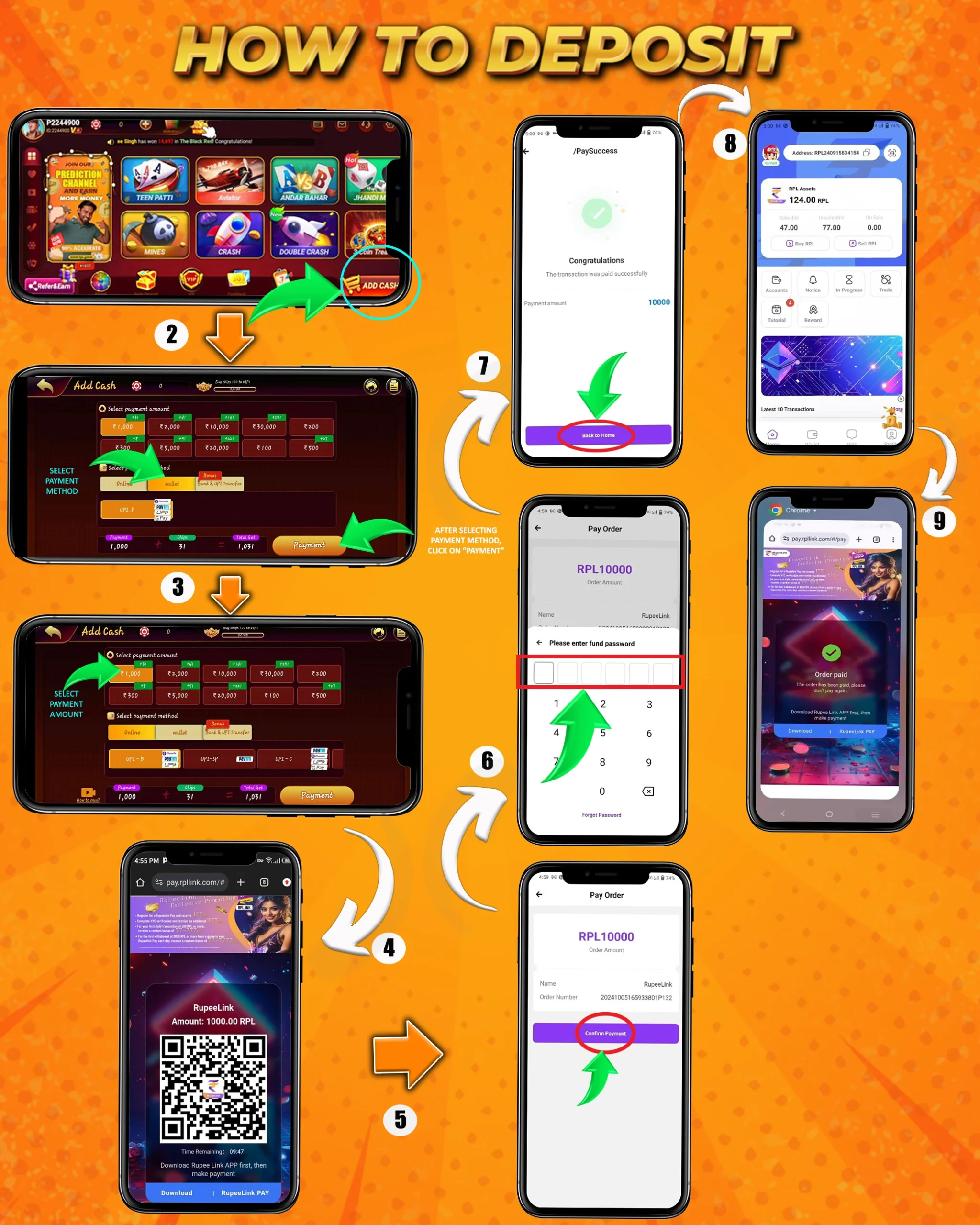
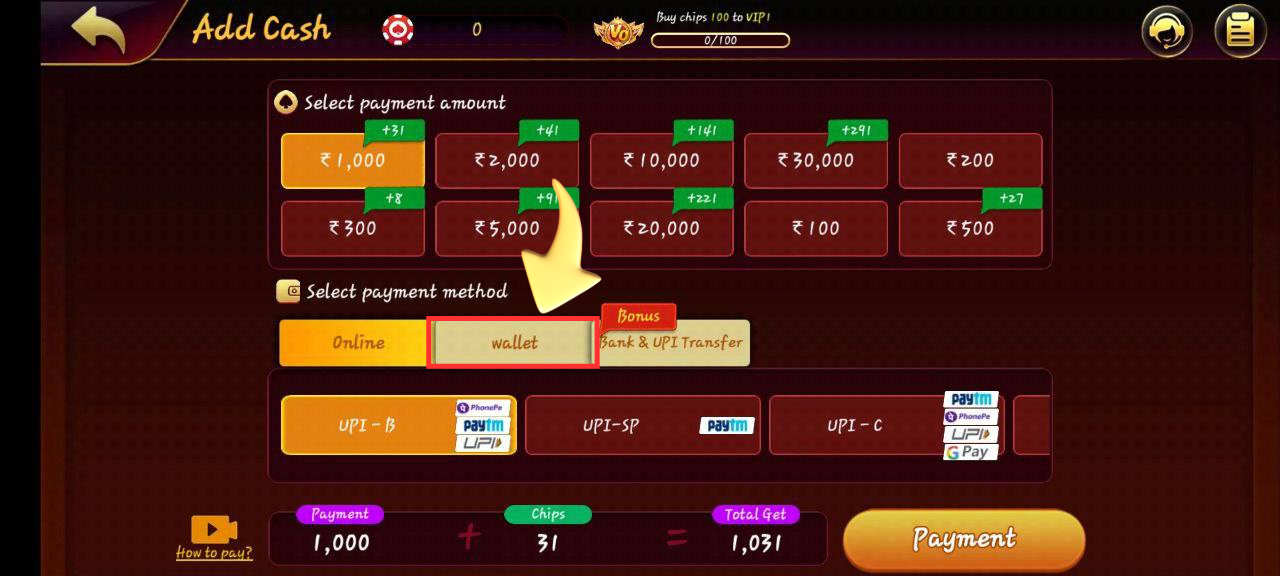
How to deposit
डिपॉज़िट कैसे करें
Deposit steps.
डिपॉज़िट के चरण।
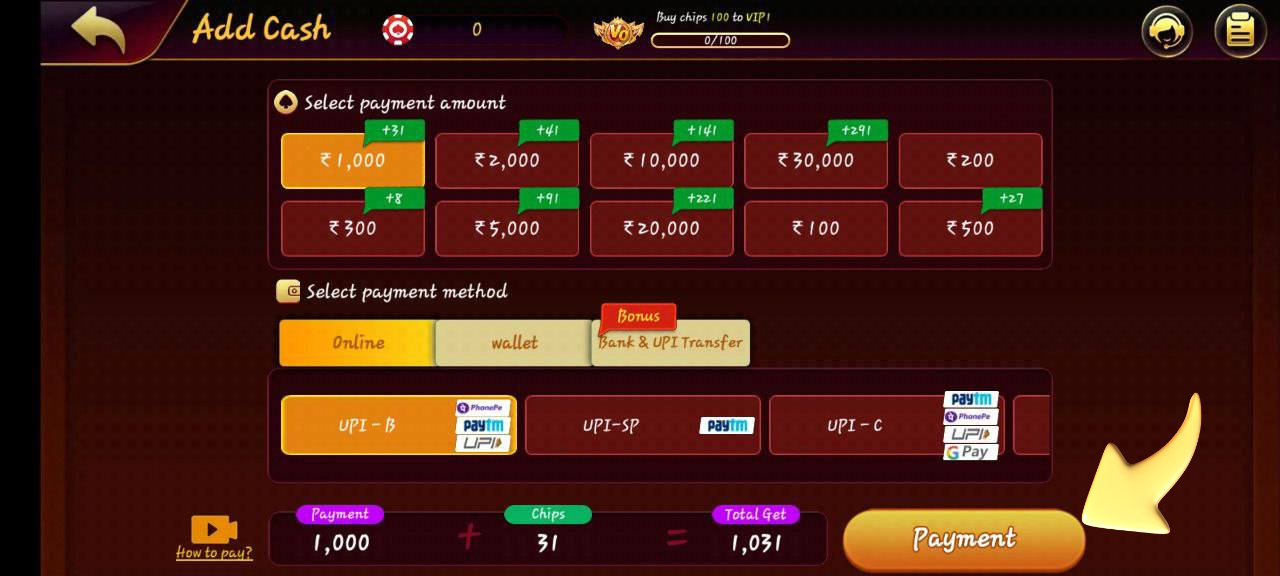
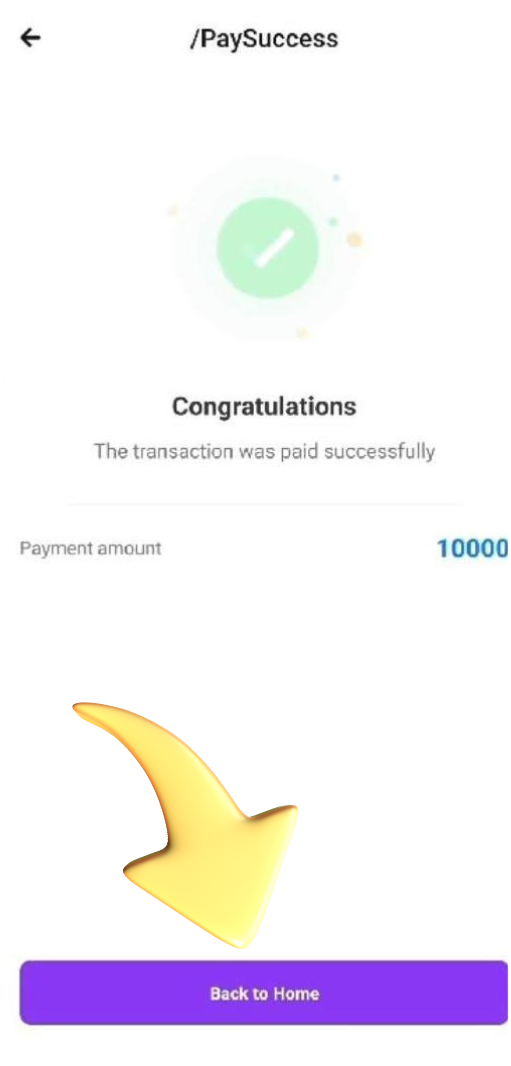
- Click ADD CASH.
- Select the payment method.
- Proceed to payment.
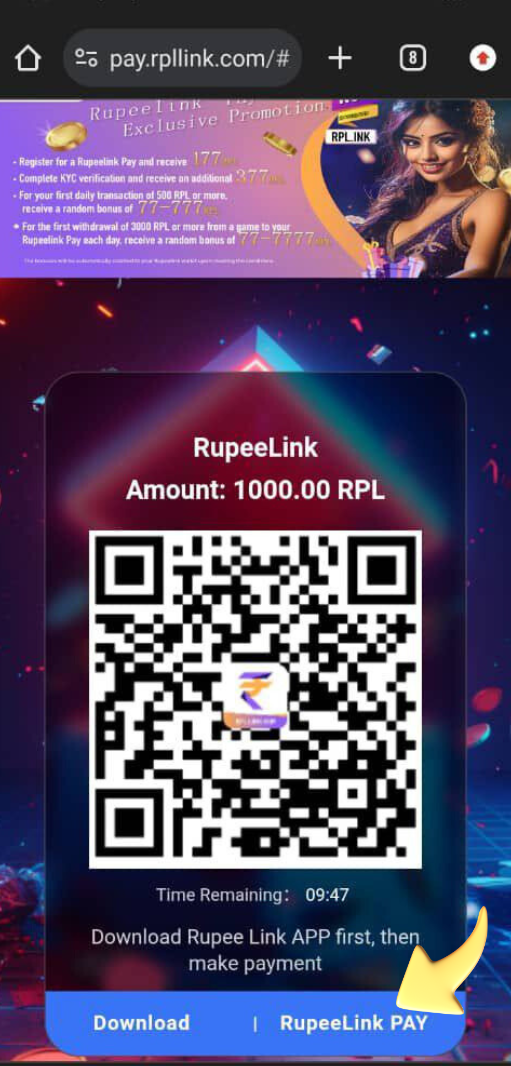
- Select RupeeLink PAY.
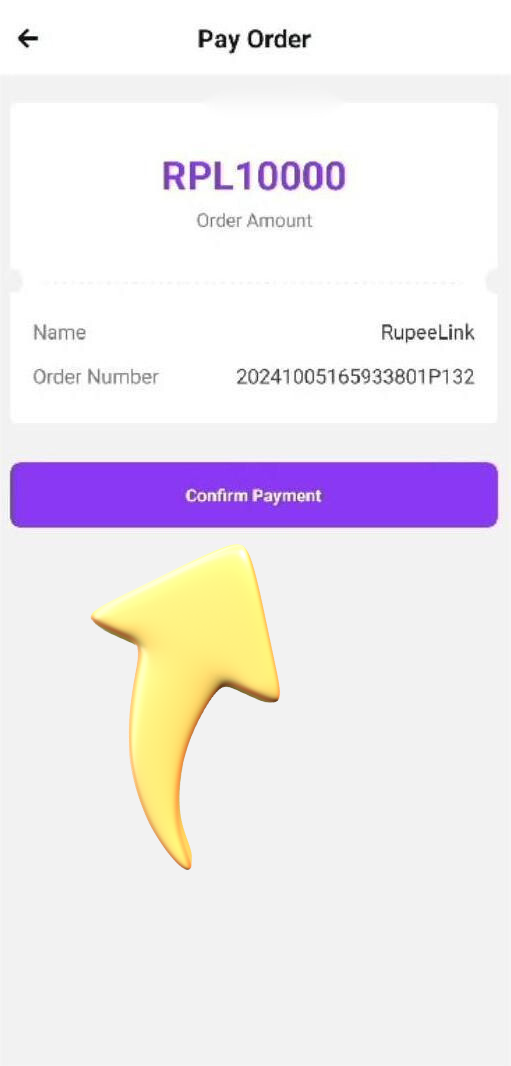
- Confirm the payment.
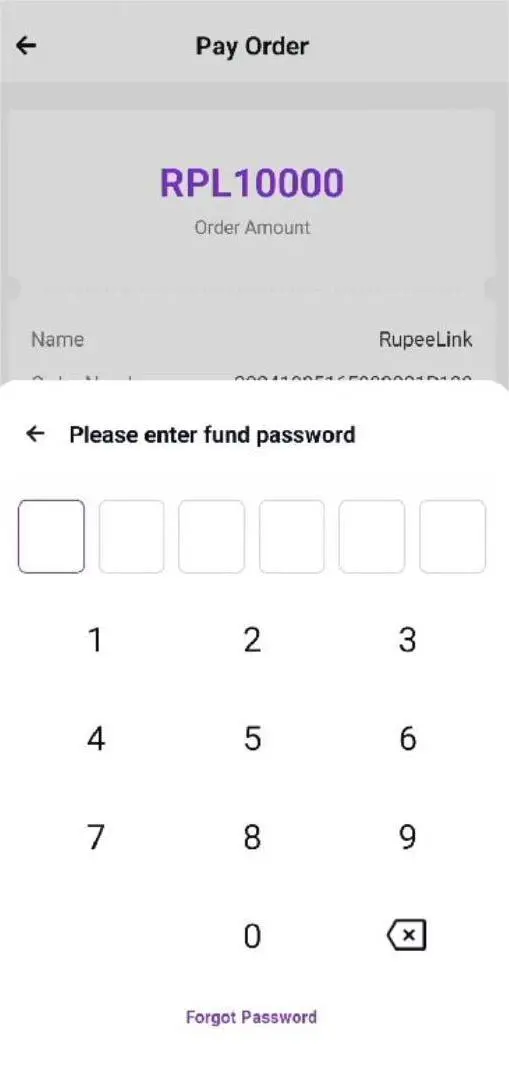
- Enter your PIN.
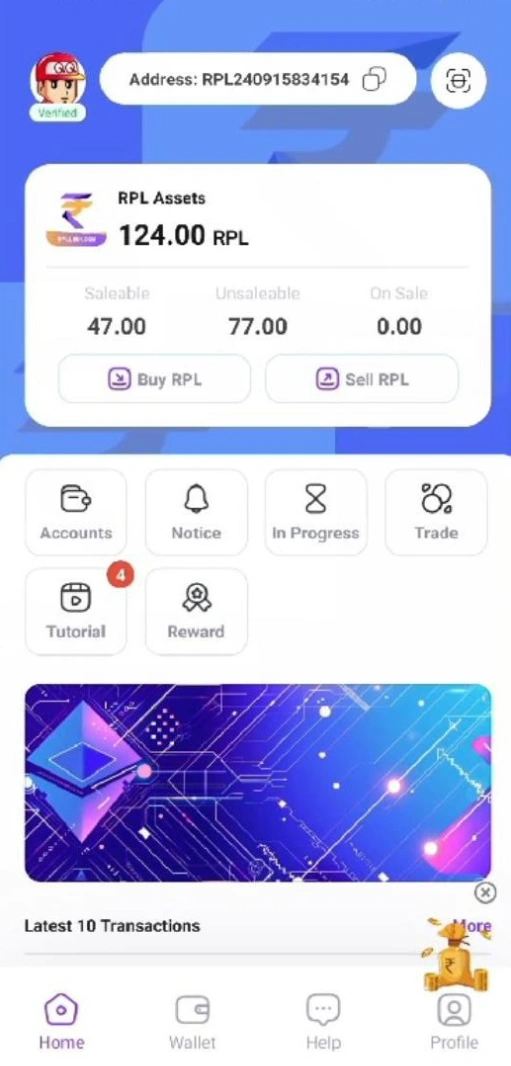
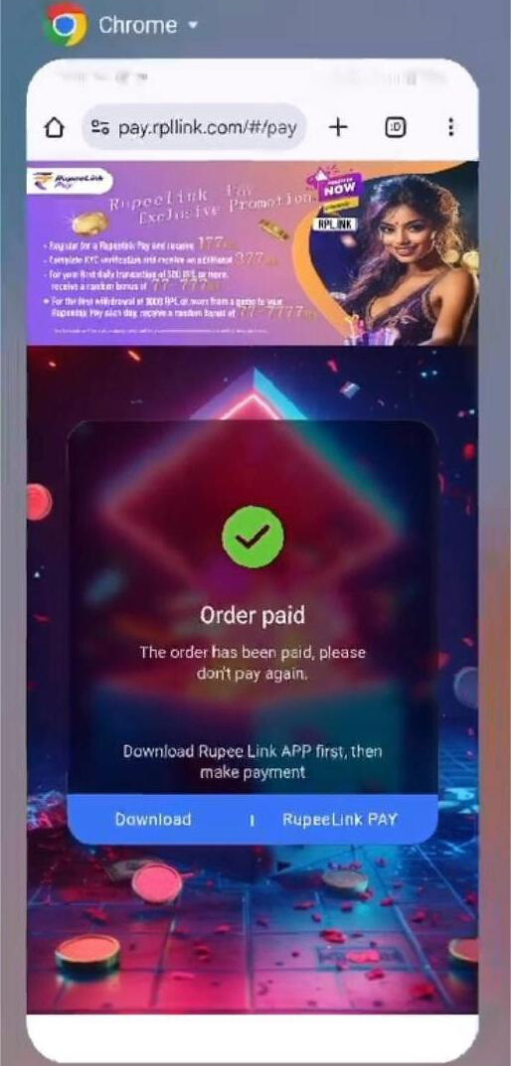
- The payment is successful.
- 'ADD CASH' पर क्लिक करें।
- पेमेंट मेथड चुनें।
- पेमेंट आगे बढ़ाएँ।
- RupeeLink PAY चुनें।
- पेमेंट कन्फ़र्म करें।
- अपना पिन दर्ज करें।
- पेमेंट सफल हो जाता है।

Video not playing? Open it in a new tab.वीडियो नहीं चल रहा? इसे नए टैब में खोलें।
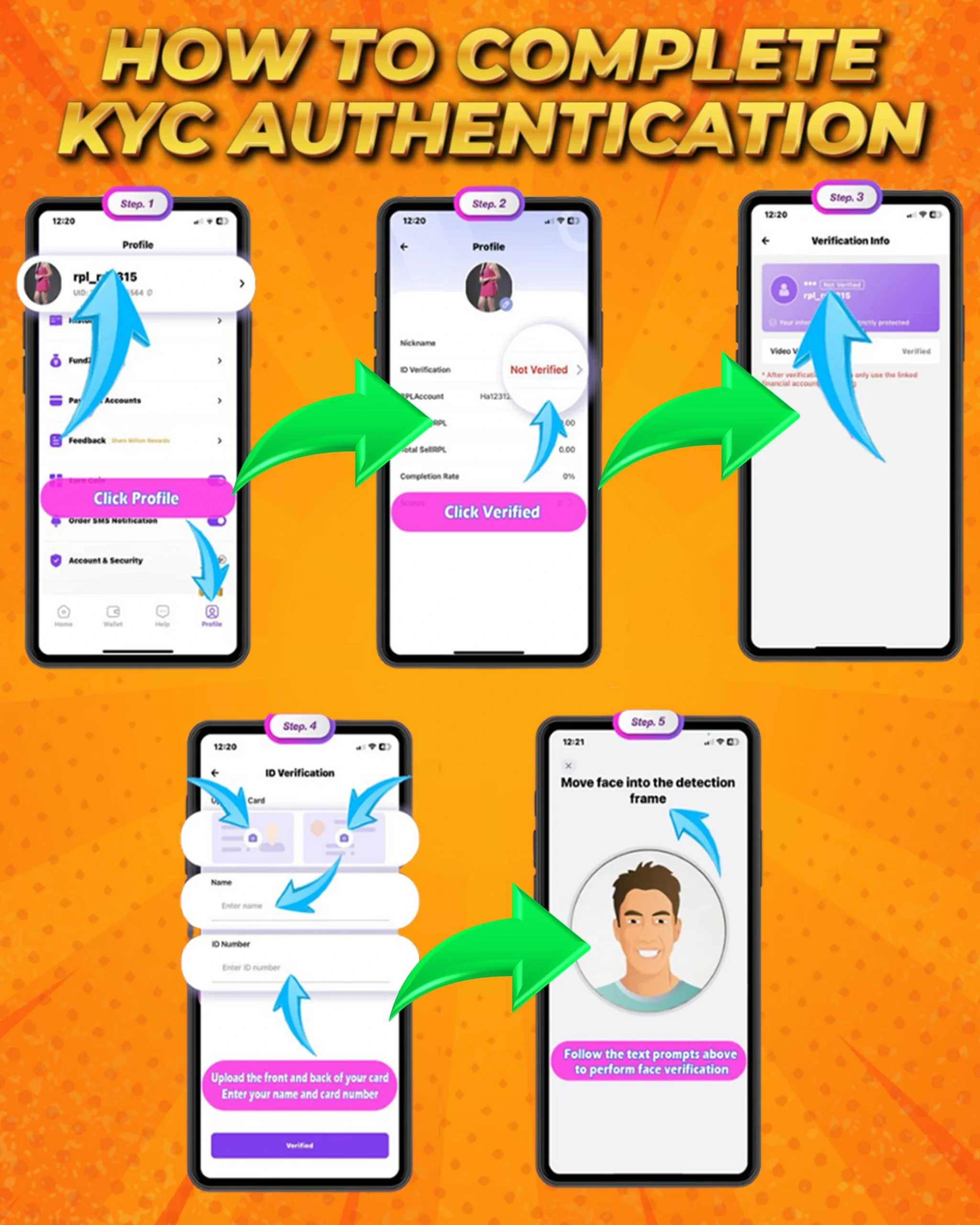
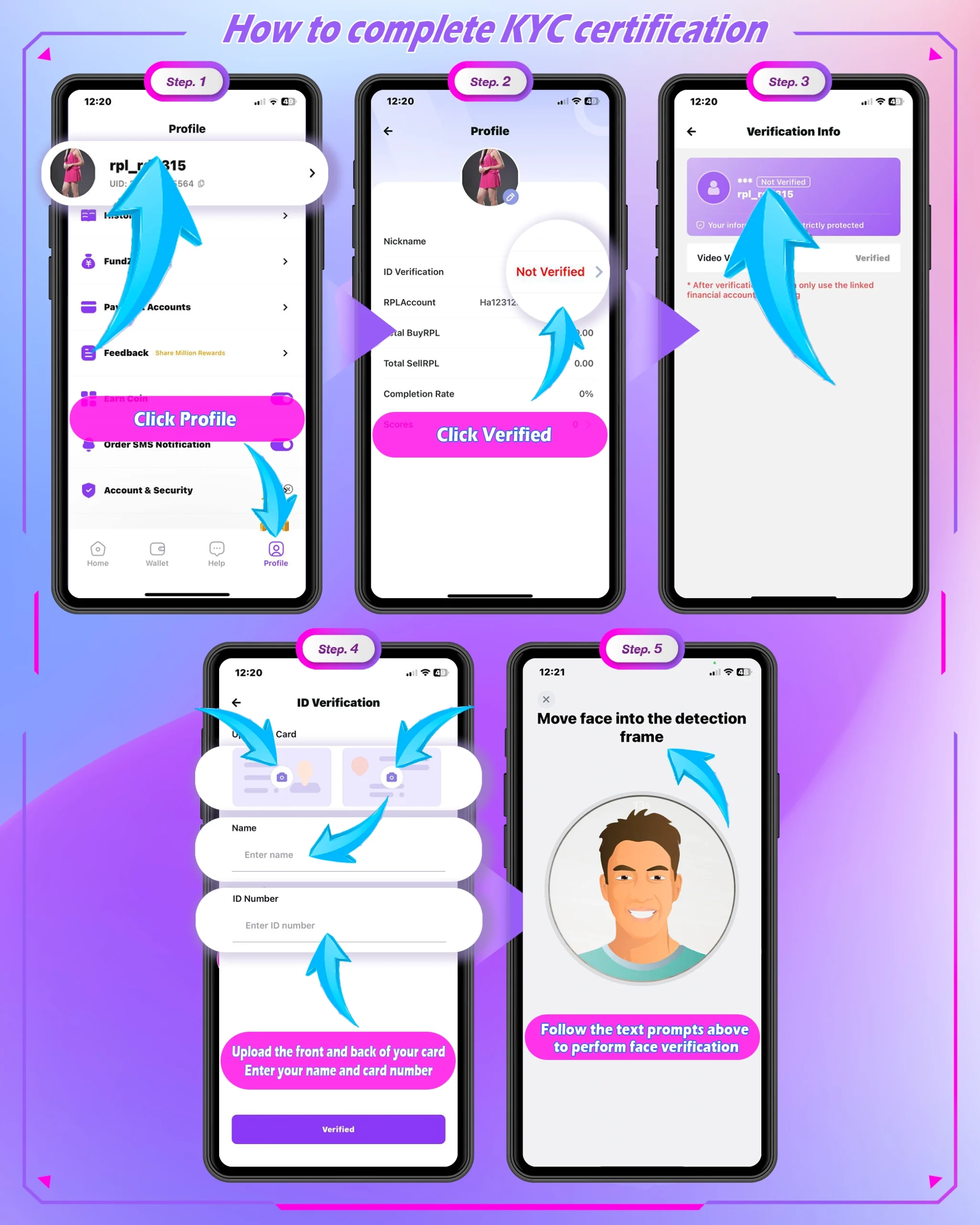
KYC authenticate
KYC ऑथेंटिकेशन
Operational steps.
ऑपरेशनल चरण।
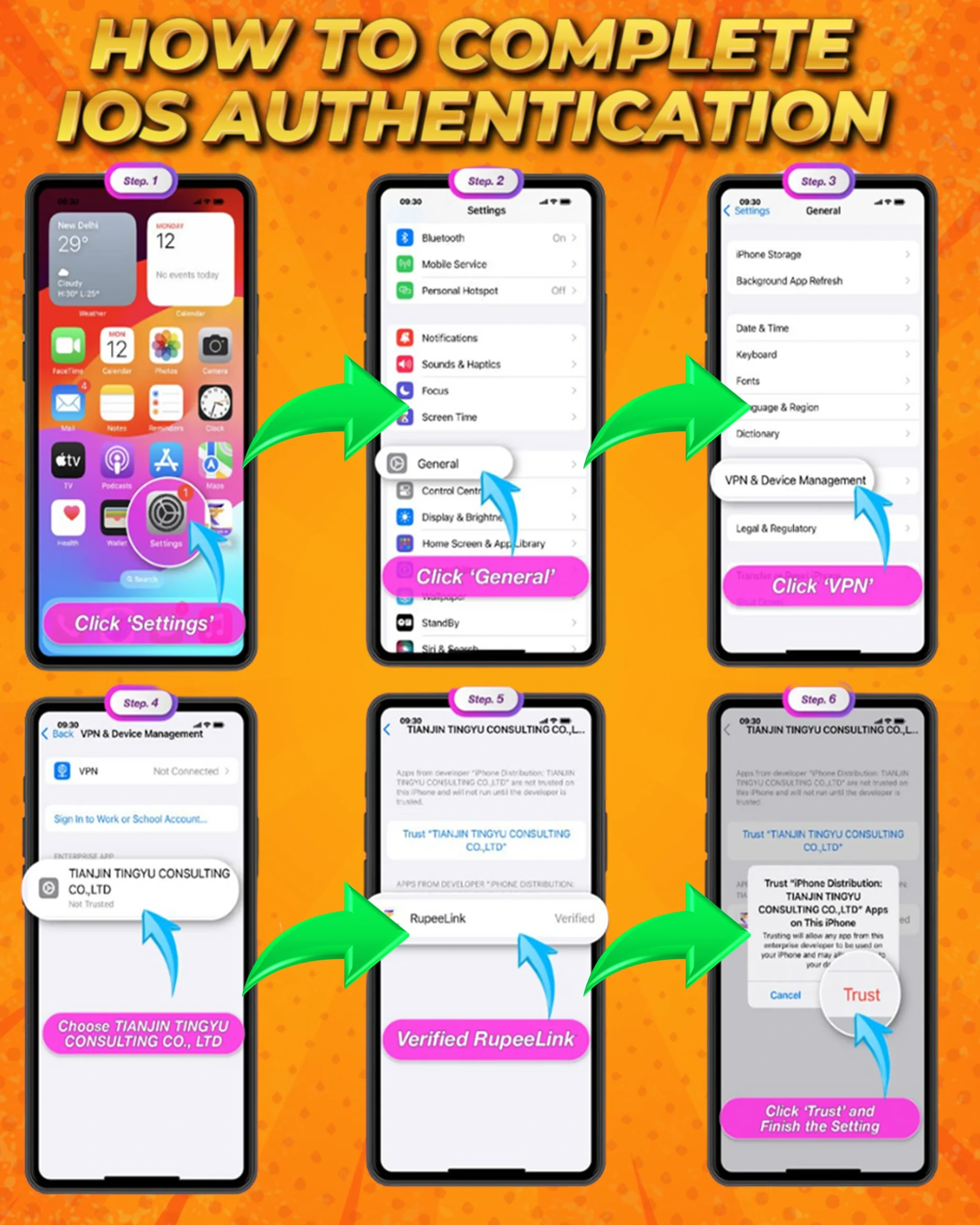
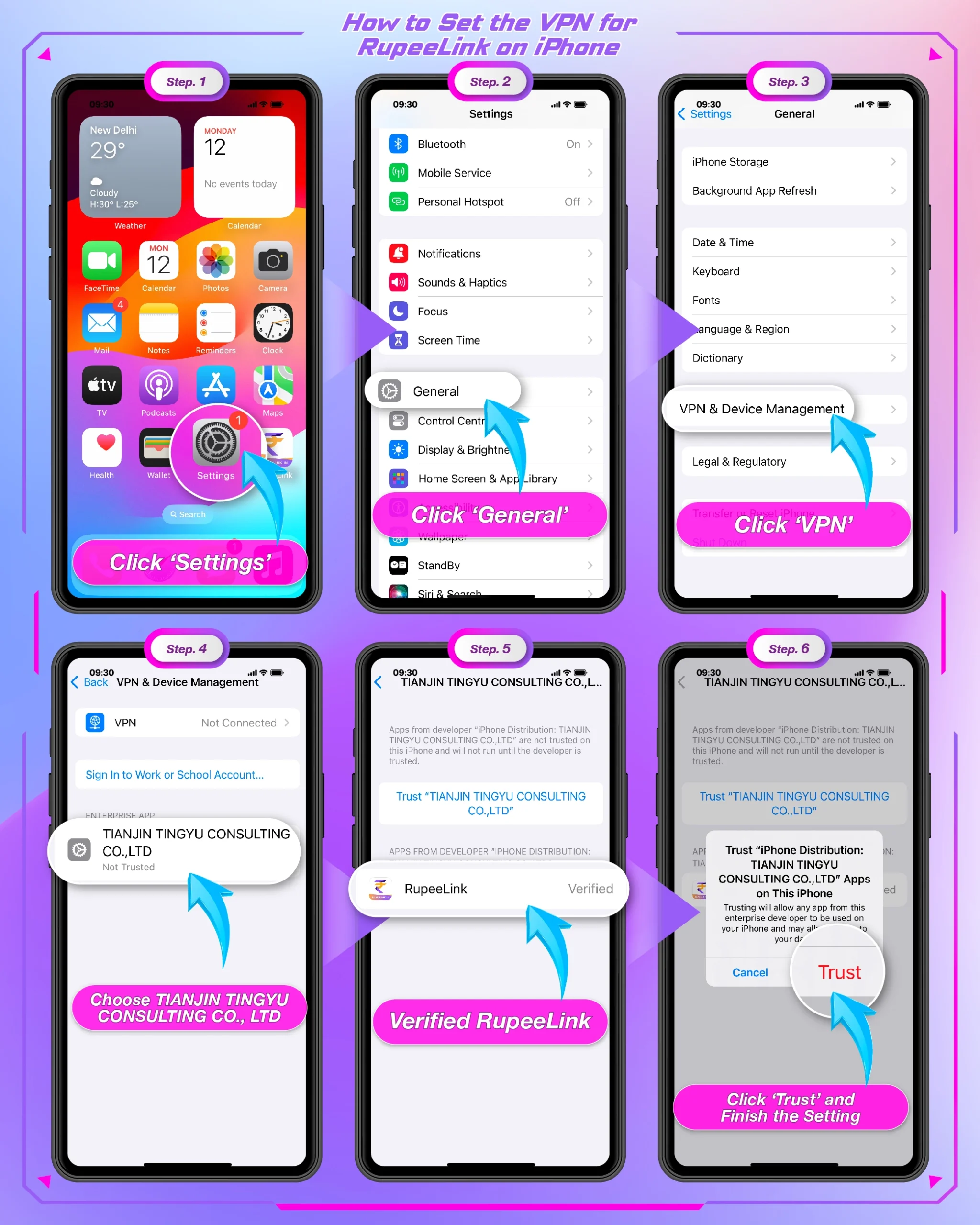
iOS authenticate
iOS ऑथेंटिकेशन
Operational steps for iPhone.
iPhone के लिए ऑपरेशनल चरण।
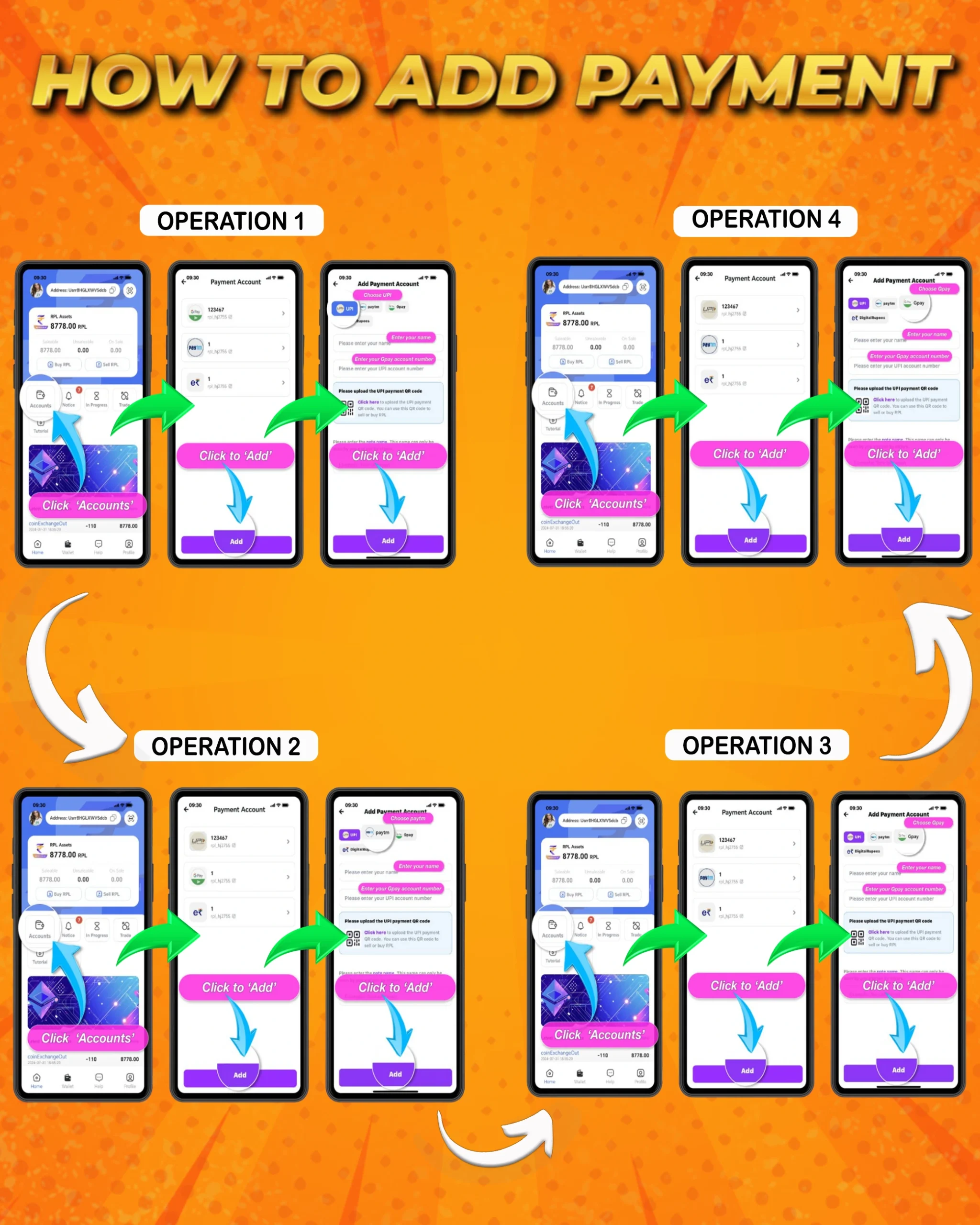
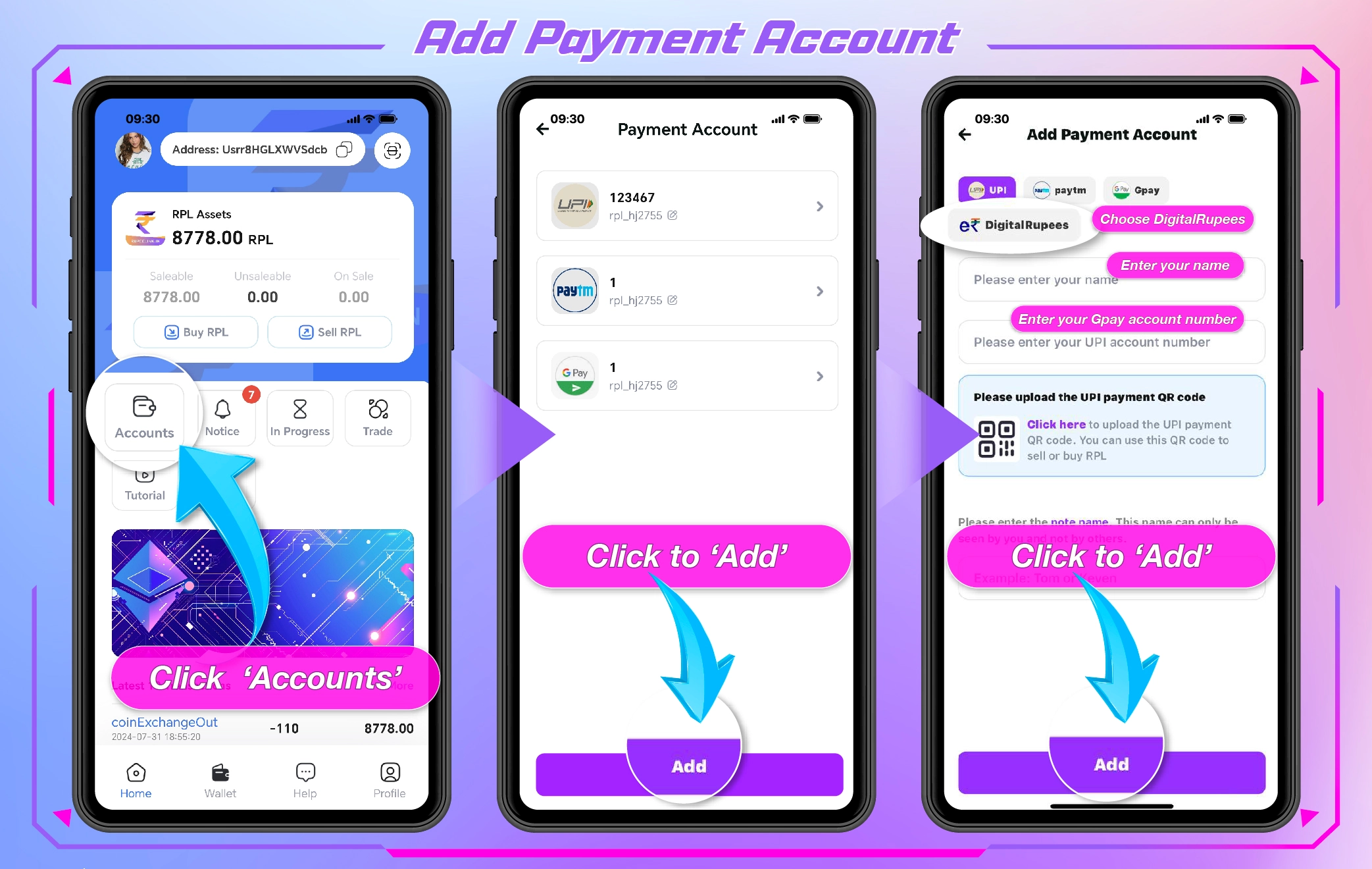
How to add payment
पेमेंट कैसे जोड़ें
Payment process in four steps.
चार चरणों में पेमेंट की प्रक्रिया।
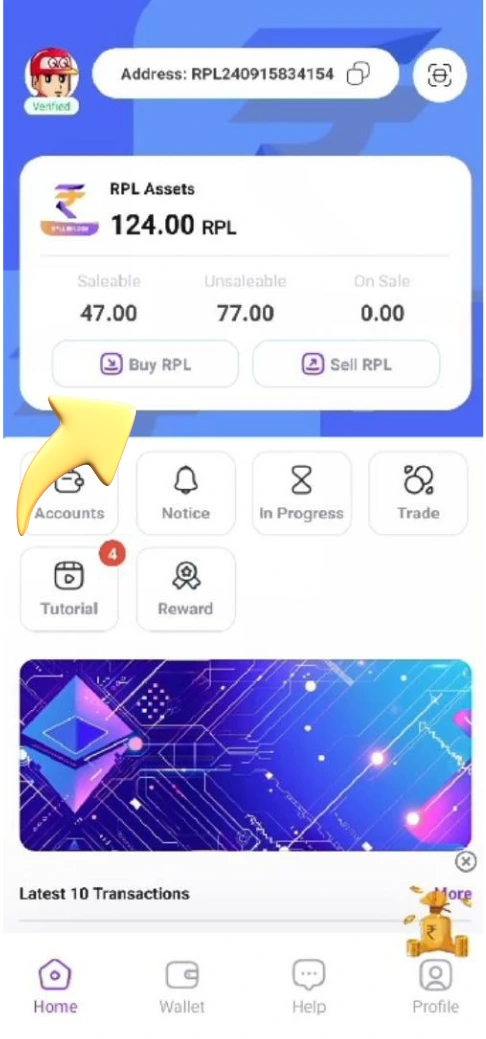
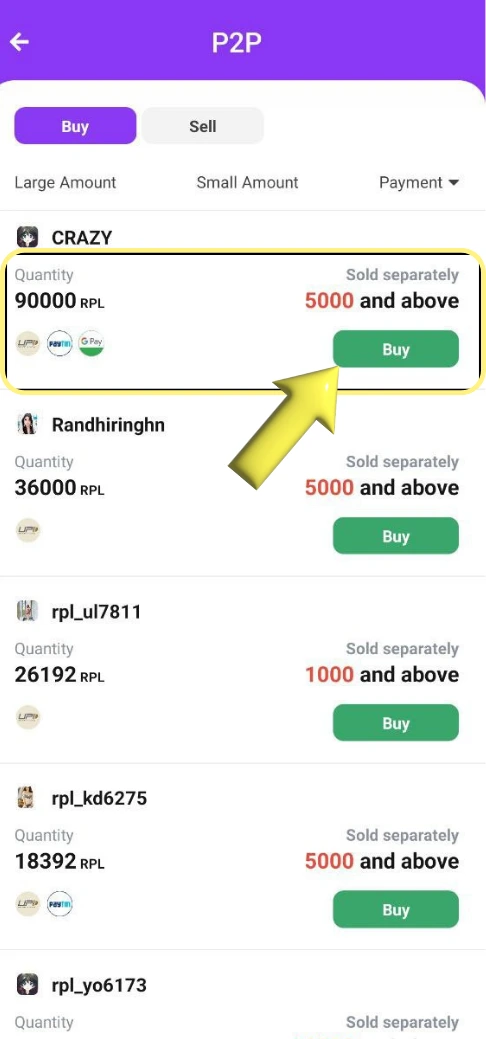
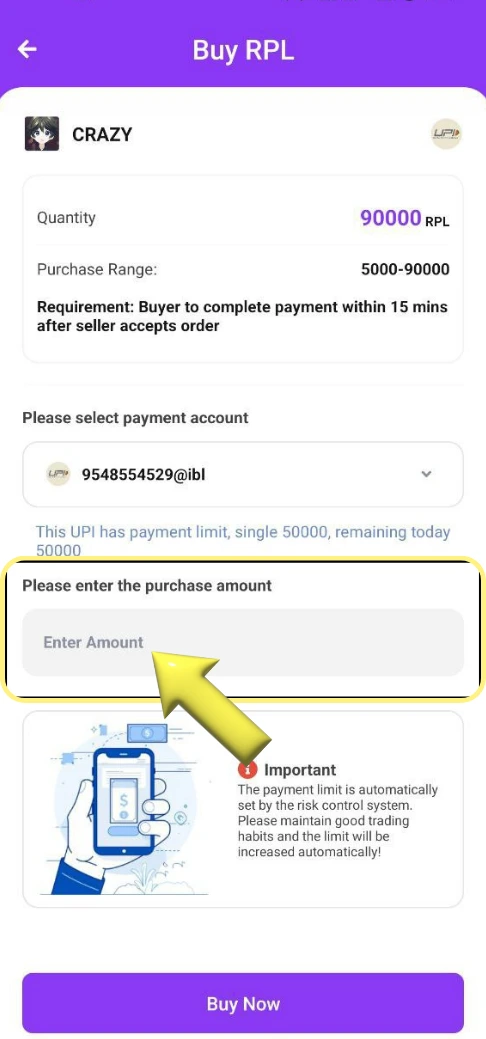
How to buy RPL
RPL कैसे खरीदें
Buy RPL step by step.
RPL खरीदने के चरण।
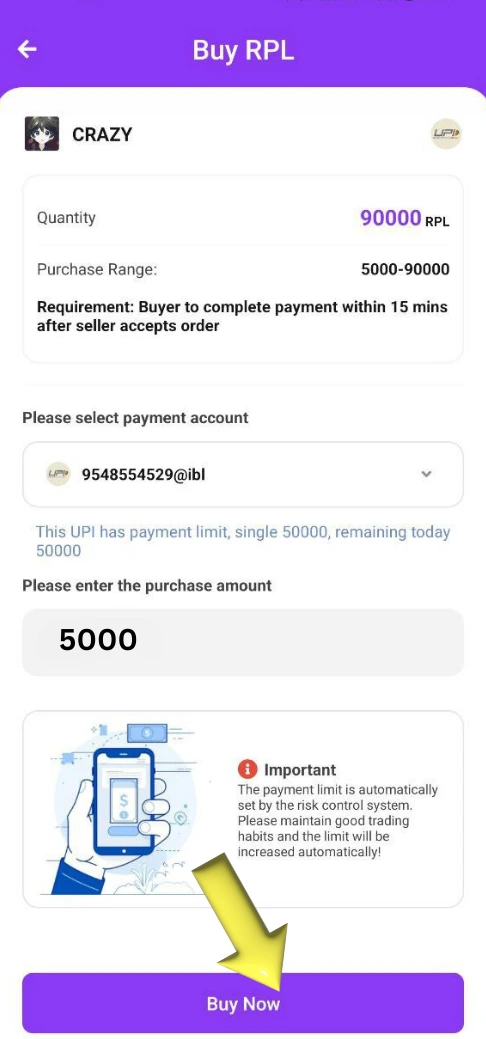
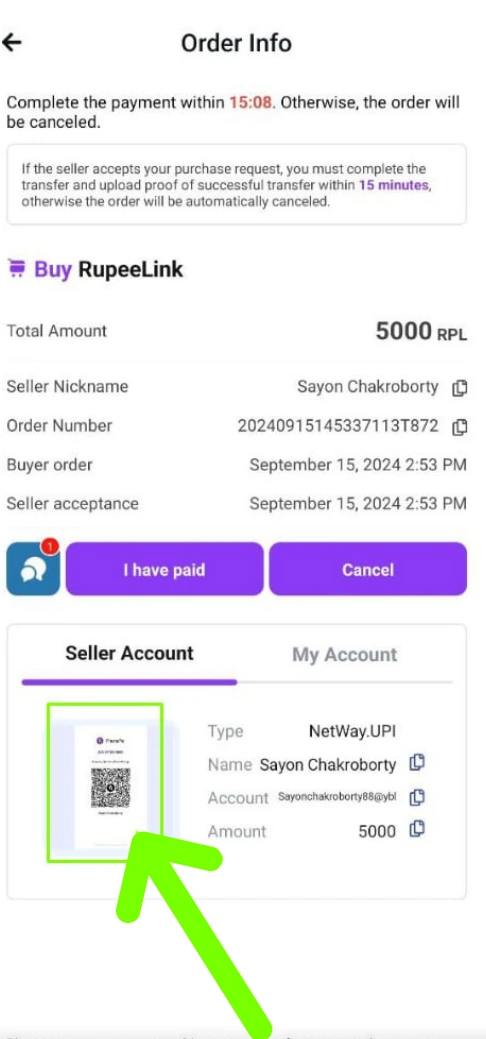
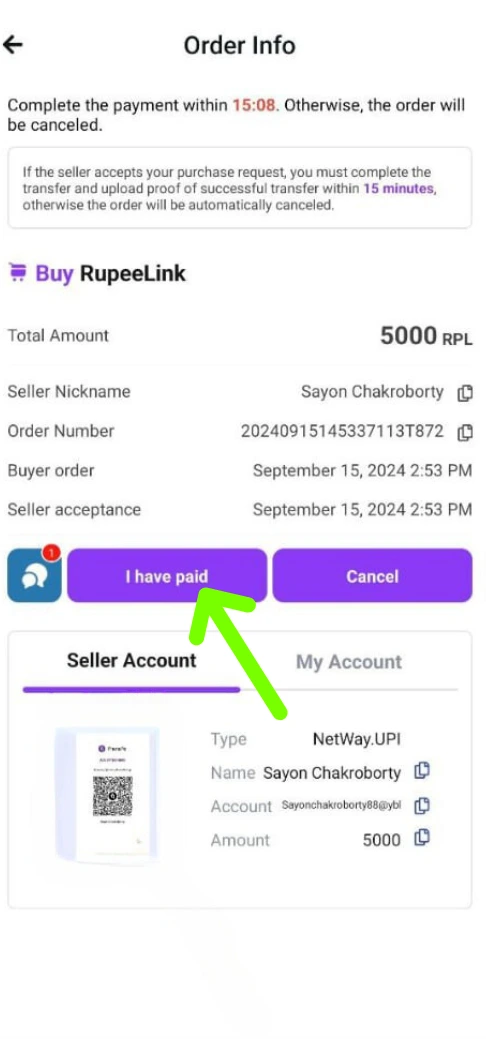
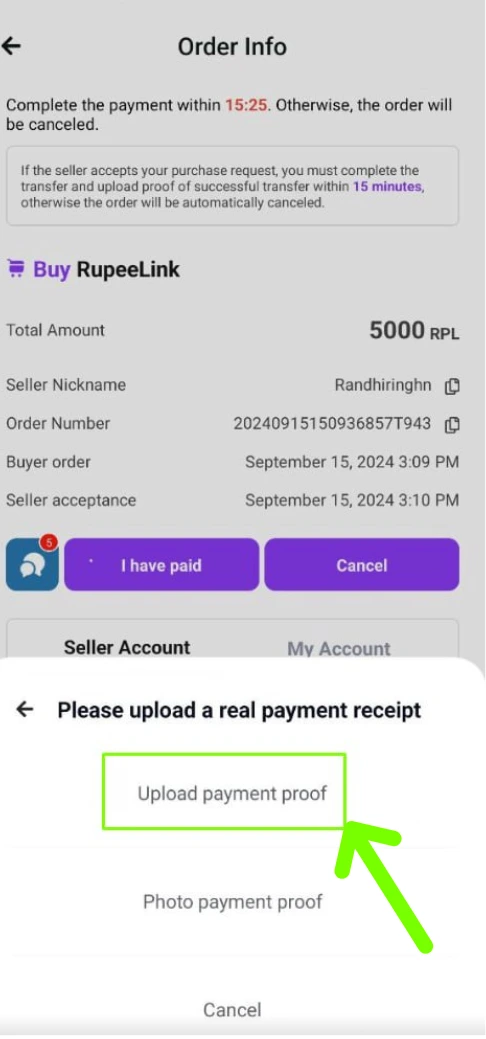
Video not playing? Open it in a new tab.वीडियो नहीं चल रहा? इसे नए टैब में खोलें।
Deposit tutorial
डिपॉज़िट ट्यूटोरियल
Watch the deposit process in a video.
डिपॉज़िट की प्रक्रिया वीडियो में देखें।
Video not playing? Open it in a new tab.वीडियो नहीं चल रहा? इसे नए टैब में खोलें।
Stars777 guide: frequently asked questionsStars777 गाइड: अक्सर पूछे जाने वाले प्रश्न
Quick answers to the questions we hear most.सबसे ज़्यादा पूछे जाने वाले सवालों के त्वरित जवाब।
Where do I start with the Stars777 guide?Stars777 गाइड में शुरुआत कहाँ से करूँ?
Open the Operational Guide for an overview, then follow How to register and How to deposit. Every guide shows the screens step by step.
ओवरव्यू के लिए Operational Guide खोलें, फिर 'रजिस्टर कैसे करें' और 'डिपॉज़िट कैसे करें' गाइड का पालन करें। हर गाइड स्क्रीन को चरण-दर-चरण दिखाती है।
What is the difference between the UPAY and Tutorials tabs?UPAY और ट्यूटोरियल टैब में क्या अंतर है?
UPAY holds the newest wallet guides: register, add a payment account, buy and sell RPL, pay and withdraw. Tutorials are the original step-by-step guides for registering, depositing, KYC, adding a payment and buying RPL. Use the tabs at the top of the page or the guide list to switch.
UPAY में सबसे नई वॉलेट गाइड हैं: रजिस्टर, पेमेंट अकाउंट जोड़ना, RPL खरीदना और बेचना, पेमेंट और निकासी। ट्यूटोरियल रजिस्टर, डिपॉज़िट, KYC, पेमेंट जोड़ने और RPL खरीदने की मूल स्टेप-बाय-स्टेप गाइड हैं। बदलने के लिए पेज के ऊपर टैब या गाइड सूची का उपयोग करें।
How do I deposit?डिपॉज़िट कैसे करूँ?
Click ADD CASH, select the payment method, proceed to payment, select RupeeLink PAY, confirm the payment and enter your PIN. The How to deposit guide has screenshots for every step and a video.
'ADD CASH' पर क्लिक करें, पेमेंट मेथड चुनें, पेमेंट आगे बढ़ाएँ, RupeeLink PAY चुनें, पेमेंट कन्फ़र्म करें और अपना पिन दर्ज करें। 'डिपॉज़िट कैसे करें' गाइड में हर चरण का स्क्रीनशॉट और एक वीडियो है।
How do I complete KYC, and what about iPhone?KYC कैसे पूरा करूँ, और iPhone के लिए क्या करूँ?
Follow the KYC authenticate guide. iPhone users should also follow the iOS authenticate guide.
KYC ऑथेंटिकेशन गाइड का पालन करें। iPhone उपयोगकर्ता iOS ऑथेंटिकेशन गाइड का भी पालन करें।
How do I add a payment account?पेमेंट अकाउंट कैसे जोड़ूँ?
Open How to add payment. It shows the four steps with screenshots.
'पेमेंट कैसे जोड़ें' खोलें। इसमें स्क्रीनशॉट के साथ चारों चरण दिखाए गए हैं।
How do I buy RPL?RPL कैसे खरीदूँ?
Open How to buy RPL for the screens and a video walkthrough.
स्क्रीन और वीडियो वॉकथ्रू के लिए 'RPL कैसे खरीदें' खोलें।
Is the guide available in Hindi?क्या गाइड हिंदी में उपलब्ध है?
Yes. Use the language button in the header to switch the page text between English and Hindi. The UPAY guides also have Hindi screenshots; the screenshots in the Tutorials come from the app and stay in English.
हाँ। पेज का टेक्स्ट अंग्रेज़ी और हिंदी के बीच बदलने के लिए हेडर में भाषा बटन का उपयोग करें। UPAY गाइड के हिंदी स्क्रीनशॉट भी हैं; ट्यूटोरियल के स्क्रीनशॉट ऐप से लिए गए हैं और अंग्रेज़ी में ही रहते हैं।
A video is not playing. What can I do?कोई वीडियो नहीं चल रहा। मैं क्या करूँ?
Use the link under the video to open it in a new tab. Make sure your connection is stable and your browser is up to date.
वीडियो के नीचे दिए लिंक से उसे नए टैब में खोलें। सुनिश्चित करें कि आपका कनेक्शन स्थिर है और आपका ब्राउज़र अपडेट है।
How do I contact customer service?ग्राहक सेवा से कैसे संपर्क करूँ?
Customer service is available 24/7. Use the Contact customer service button on this page to open the chat.
ग्राहक सेवा 24/7 उपलब्ध है। चैट खोलने के लिए इस पेज पर 'ग्राहक सेवा से संपर्क करें' बटन का उपयोग करें।
Still need a hand?अभी भी मदद चाहिए?
Customer service is available around the clock.ग्राहक सेवा चौबीसों घंटे उपलब्ध है।